 Code & Development
Code & Development · 11 Jun 2026
Algorithms and Programming Logic: Every Developer's Map
Learn to solve problems on paper before coding. Understand sequence, selection, repetition, sorting algorithms, and Big O complexity.
You didn't get stuck because algorithms are hard. You got stuck because no one showed you the problem before handing you the solution. This article fixes that — from the simplest concept all the way to complexity analysis.
That feeling has a name — and it has a solution. It happens when you try to write code before thinking about the algorithm. It's like trying to build a house without a blueprint: you might even put up some walls, but soon you realize the bathroom ended up in the wrong place.
This article will show you the map every developer needs to master before typing the first line of code.
What Is an Algorithm, Really?
Forget the academic definition for a second.
An algorithm is simply a finite, ordered sequence of steps to solve a problem. No ambiguity. No steps that rely on guessing. Each instruction needs to be clear enough for a machine — which doesn't think, it only executes — to follow.
Think about your grandmother's cake recipe. It has ingredients (input data), a preparation order (executable steps), and an expected result (output). If you skip a step or change the order, the cake won't turn out right. With algorithms, the logic is exactly the same.
The big mental shift that separates beginner programmers from solid programmers is: first you solve the problem on paper, then you write the code.
The Three Structures That Govern Everything
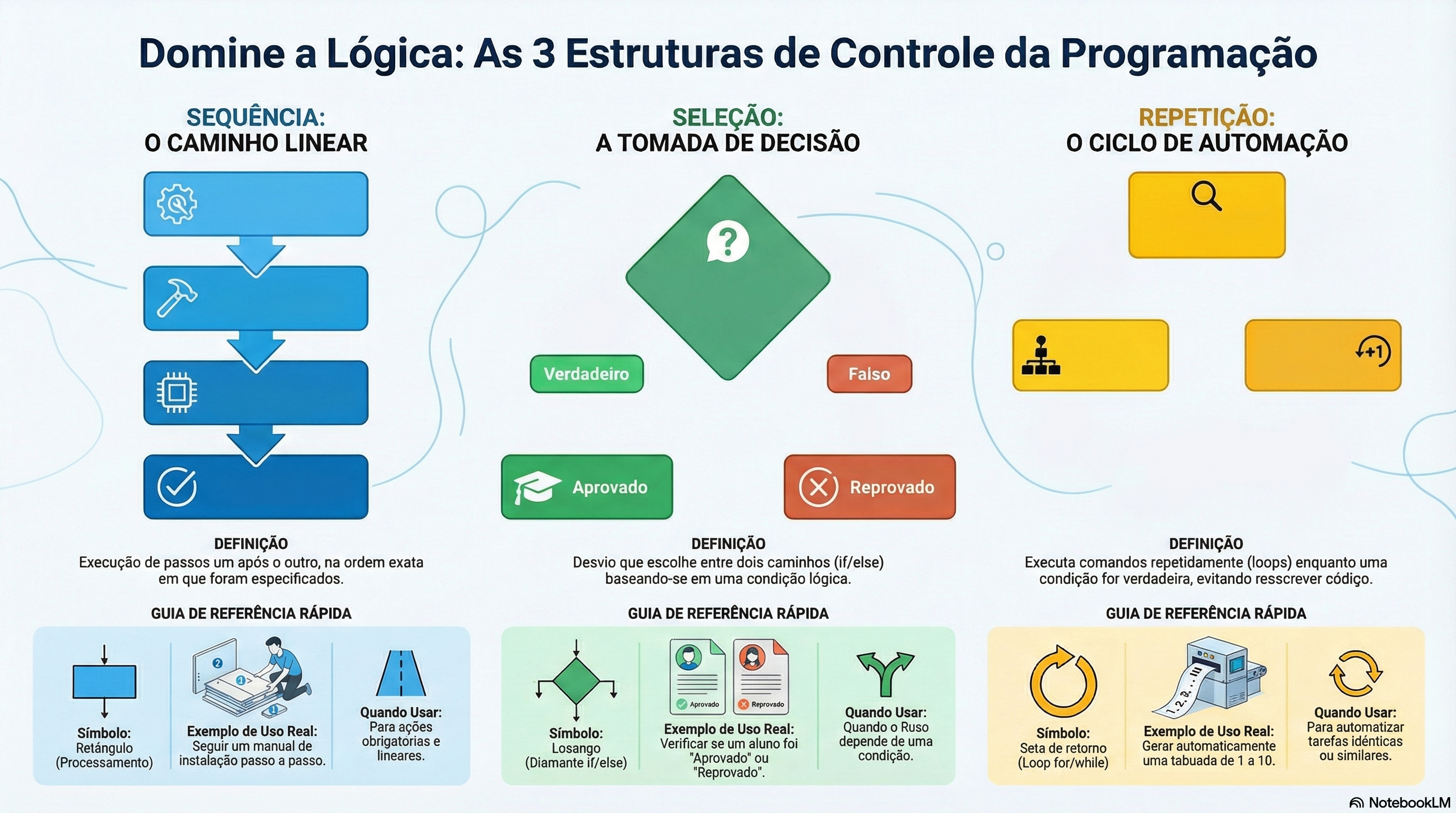
All programming logic — regardless of language — rests on just three control structures. Yes, just three.
1. Sequence
The simplest one. Steps are executed one after another, in the order they appear.
int x = 10;
int y = 20;
int soma = x + y;
printf("Resultado: %d\n", soma);
No surprises. The computer reads line by line, from top to bottom.
2. Selection (Decision)
This is where the program gains intelligence. Depending on a condition, it chooses one path or another.
if (temperatura > 38) {
    printf("Febre detectada. Consulte um médico.\n");
} else {
    printf("Temperatura normal.\n");
}
There are three main forms of selection:
Simple: one or two alternative paths (
if/else)Chained: choice between multiple paths (
if/else if/else)Multiple: compare a variable against several fixed values (
switch/case)
The switch/case is perfect when you have many well-defined options — like the days of the week or the options in a menu.
3. Repetition (Loops)
The heart of automation. Running the same block of code multiple times without having to rewrite it.
Counted repetition — when you know exactly how many times you will repeat:
for (int i = 1; i <= 10; i++) {
    printf("%d\n", i);
}
Repetition with pre-condition — when you test the condition before entering the loop:
while (saldo > 0) {
    saldo -= parcela;
}
Repetition with post-condition — when the block needs to execute at least once:
do {
    printf("Digite um número positivo: ");
    scanf("%d", &numero);
} while (numero <= 0);
Golden rule: avoid infinite loops interrupted by break. If you need a break to exit a loop, the stop condition was probably poorly defined.
Data Types: The Raw Material of the Program
Before processing any information, the computer needs to know what type of data it is dealing with. In C, the basic types are:
Type | What it stores | Example |
|---|---|---|
int | Integer numbers | 42, -7, 0 |
float | Numbers with decimal places | 3.14, -0.5 |
char | A single character | 'A', 'z' |
char[] | Character string (text) | "Hello, world" |
These data live as variables (values that change during execution) or constants (values that never change). Using constants for fixed values — such as PI = 3.14159 — makes the code more readable and safe.
Functions: The Secret of Clean Code
If you catch yourself repeating the same block of code in different places, it's a sign that that snippet deserves to become a function.
A function is a block of code with a specific purpose. It receives data (parameters), processes it, and returns a result.
float calcularMedia(float nota1, float nota2, float nota3) {
    return (nota1 + nota2 + nota3) / 3;
}
There are two fundamental types:
void: the function performs an action and returns nothing (like printing to the screen)
Typed (int, float...): the function performs a calculation and returns a result
Good functions have names that describe exactly what they do. calcularMedia() is much better than func1(). Your future self — and your teammates — will thank you.
Best Practices That Make a Difference
Mastering the syntax is the easy part. What separates amateur code from professional code are the habits.
Plan before coding. Before opening the editor, define: what data goes in? What comes out? What is the sequence of steps? A sketch on paper is worth more than an hour of trial and error.
Comment what is not obvious. The compiler ignores comments, but your colleagues (and you yourself, six months from now) don't. Document the intent of the code, not just what it does.
// Calcula o índice de massa corporal conforme tabela da OMS
float imc = peso / (altura * altura);
Write portable code. Avoid operating-system-specific functions when an alternative exists in the ISO C standard. Portable code runs on Windows, Linux, and Unix without modifications.
Use meaningful names. temperatura, contador, nomeUsuario are infinitely better than t, c, n. Clarity is not fussiness — it's respect for whoever reads your code next.
Best Practices
Four habits that make code easier to read, maintain, and port across systems.
Plan first
Plan before coding
- Sketch inputs, outputs, and steps on paper before opening the editor.
Document
Comment the non-obvious
- Document the why for your future self and colleagues.
Portable
Write portable code
- Prefer ISO C standard functions over OS-specific ones; runs on Windows, Linux, and Unix without modifications.
Clarity
Use meaningful names
- Choose temperatura or nomeUsuario instead of t or n. Clarity is respect for whoever reads your code next.
Classic Algorithms Every Programmer Should Know
Theory without practice is decoration. See how the concepts above materialize in real algorithms — the same ones used in databases, search systems, and everyday applications.
Linear Search vs. Binary Search: the difference that changes everything
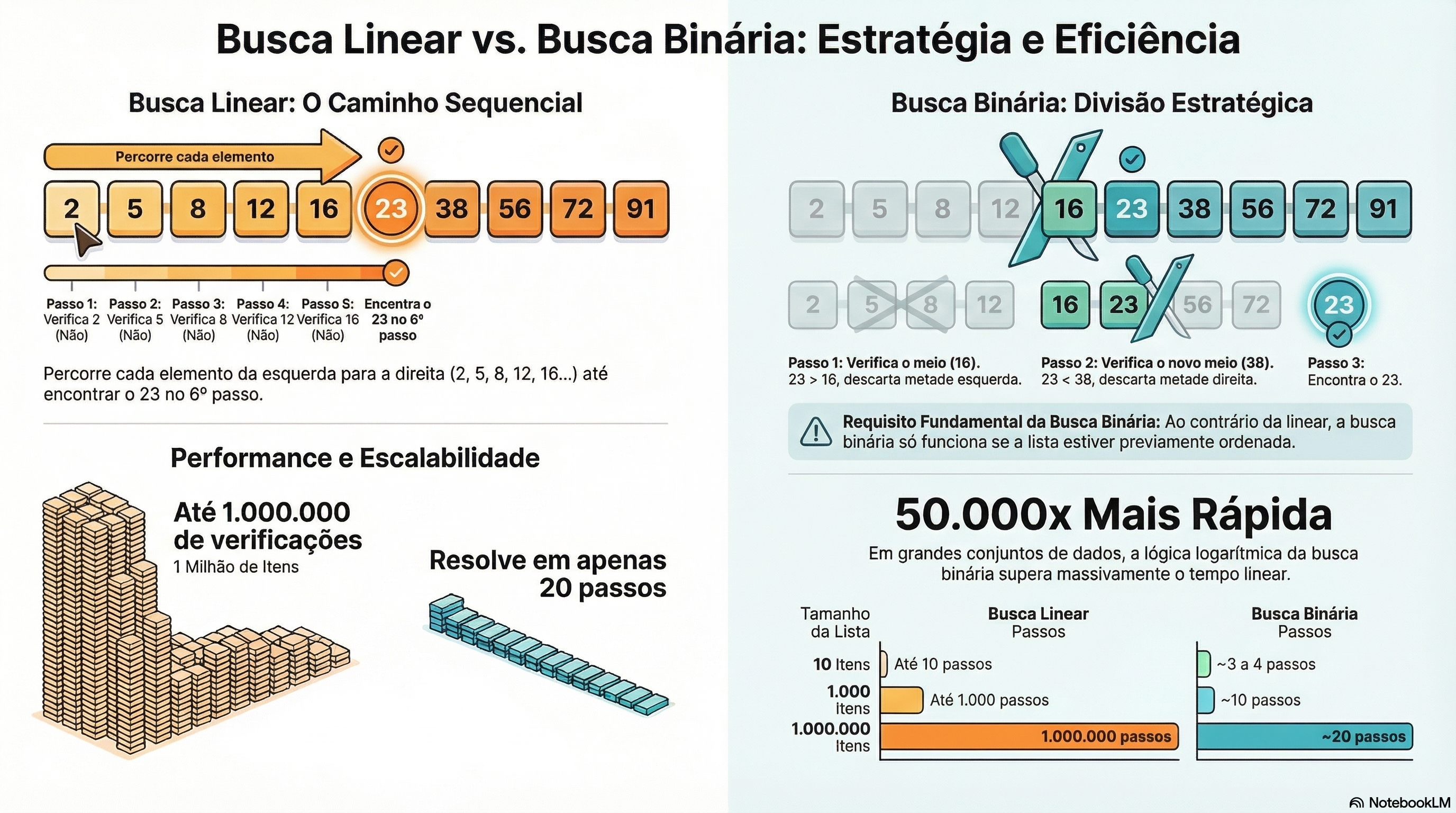
Imagine you need to find the number 23 in a list of a thousand numbers.
Linear Search — checks one by one, from start to finish:
def busca_linear(lista, alvo):
    for i in range(len(lista)):
        if lista[i] == alvo:
            return i  # retorna o índice onde encontrou
    return -1  # não encontrado

numeros = [2, 5, 8, 12, 16, 23, 38, 56, 72, 91]
print(busca_linear(numeros, 23))  # saída: 5
It works. But in the worst case, it goes through all elements. In a list of one million? One million comparisons.
Binary Search — splits the problem in half at each step. Requires a sorted list:
def busca_binaria(lista, alvo):
    inicio = 0
    fim = len(lista) - 1

    while inicio <= fim:
        meio = inicio + (fim - inicio) // 2

        if lista[meio] == alvo:
            return meio          # encontrou!
        elif lista[meio] < alvo:
            inicio = meio + 1    # descarta a metade esquerda
        else:
            fim = meio - 1       # descarta a metade direita

    return -1  # não encontrado

numeros = [2, 5, 8, 12, 16, 23, 38, 56, 72, 91]
print(busca_binaria(numeros, 23))  # saída: 5
In a list of one million elements, binary search finds any value in at most 20 comparisons. It's not magic — it's a logarithm.
Algorithm | Worst case (1 million items) | Requires sorting? |
|---|---|---|
Linear Search | 1,000,000 comparisons | No |
Binary Search | ~20 comparisons | Yes |
Sorting Algorithms: putting the house in order
To use binary search, you need sorted data. And to sort data, you need a sorting algorithm.
Bubble Sort — the simplest to understand. It works like bubbles rising to the surface: at each pass, the largest element floats to the end:
def bubble_sort(lista):
    n = len(lista)
    for i in range(n):
        for j in range(0, n - i - 1):
            # se o elemento atual é maior que o próximo, troca
            if lista[j] > lista[j + 1]:
                lista[j], lista[j + 1] = lista[j + 1], lista[j]
    return lista

numeros = [64, 34, 25, 12, 22, 11, 90]
print(bubble_sort(numeros))  # [11, 12, 22, 25, 34, 64, 90]
The same algorithm in C:
void bubble_sort(int arr[], int n) {
    for (int i = 0; i < n - 1; i++) {
        for (int j = 0; j < n - i - 1; j++) {
            if (arr[j] > arr[j + 1]) {
                int temp = arr[j];
                arr[j] = arr[j + 1];
                arr[j + 1] = temp;
            }
        }
    }
}
Why learn Bubble Sort if it's slow? Because it teaches the fundamental sorting patterns: comparison, swapping, and multiple passes. After understanding Bubble Sort, algorithms like Merge Sort and Quick Sort make immediate sense.
Recursion: when a function calls itself
A concept that scares beginners but is elegant when you understand it: a function that solves a problem by calling itself with a smaller version of the same problem.
def fatorial(n):
    # caso base: para a recursão
    if n == 0 or n == 1:
        return 1
    # chamada recursiva com problema menor
    return n * fatorial(n - 1)

print(fatorial(5))  # 5 × 4 × 3 × 2 × 1 = 120
Every recursive function has two mandatory components:
Base case: the stopping condition (without it, infinite recursion)
Recursive call: the problem reduced to a smaller version of itself
Recursion is the foundation of powerful algorithms like Merge Sort, tree search, and graph traversal.
Algorithm Complexity: the cost of what you write
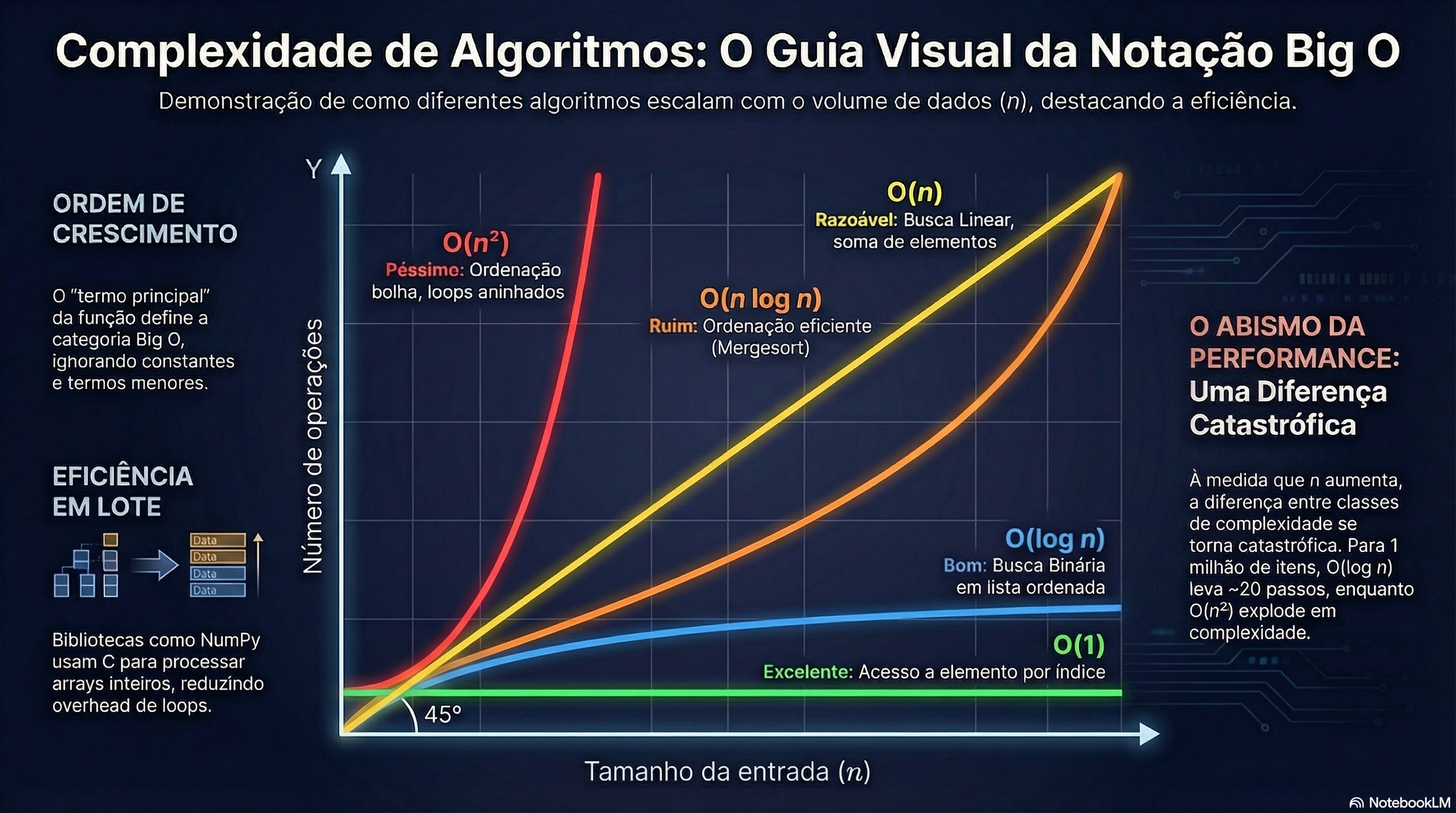
Every algorithm has a cost. The notation Big O describes how that cost grows as the input size increases.
Notation | Name | Example |
|---|---|---|
O(1) | Constant | Accessing array element by index |
O(log n) | Logarithmic | Binary Search |
O(n) | Linear | Linear Search |
O(n log n) | Linearithmic | Merge Sort, Quick Sort |
O(n²) | Quadratic | Bubble Sort, Selection Sort |
The choice of algorithm directly impacts system performance. An O(n²) algorithm applied to one million records is catastrophic. The same problem with O(log n) runs in milliseconds.
The Most Common Mistake of Those Starting Out
Most beginners try to learn programming by learning a language.
They memorize the syntax of if, of for, of while — but when they hit a real problem, they freeze. Because the problem is never syntax. The problem is logic.
The language is just notation. The algorithm is the thought.
Flip the order: first solve the problem on paper, then translate it to code. Draw the flow. Break the problem into smaller parts. Define the inputs and outputs of each part. Only then open the editor.
This habit — apparently simple — is what sets apart a programmer who moves forward from one who stays stuck forever in tutorials.
Conclusion
Algorithms and programming logic aren't college material. They're the foundation of everything you'll build as a developer.
Sequence, selection, and repetition. Data types. Well-named functions. Binary Search. Big O complexity. Planning before code.
These concepts don't go out of style. It doesn't matter if the language of the moment is C, Python, JavaScript, or whatever else emerges in the coming years — the logic behind all of them is the same.
What remains
Algorithm: finite, ordered sequence of steps to solve a problem.
Three control structures: sequence, selection, and repetition.
Data types: int, float, char — variables vs constants.
Functions: reusable blocks with a specific purpose.
Binary Search is O(log n) — exponentially faster than linear search.
Bubble Sort teaches the sorting patterns every advanced algorithm uses.
Recursion: base case + recursive call. Always.
Big O: the algorithm's cost determines whether the system scales or freezes.
First solve it on paper. Then open the editor.